

Response playbooks rarely live in one place. Some are built in Cymph, others sit in GitHub, Confluence or SharePoint, and others run inside a SOAR platform. Cymph brings all of them into a single governance layer without forcing you to migrate the underlying content: ownership of the workflow stays at the source, while Cymph tracks who is responsible, when it was last reviewed, which assets it protects and how it maps to your frameworks.
This use case walks through the full loop:
- Bring your playbooks together by importing or creating them.
- Understand what is missing on freshly imported or created content.
- Add governance context such as the RACI matrix, review settings, assets and framework mappings.
- Turn context into risk signals from the Library overview and take action from there.
1. Bring your playbooks together
Start by getting every playbook that matters into your workspace. Go to Playbooks → Library and click Import. The import dialog lists all supported sources: Cymph playbook files, SOAR platforms such as Cortex XSOAR, Cortex XSIAM, Splunk SOAR, Logic Apps and n8n, documents in PDF, DOC, Markdown or plain text, and knowledge repositories such as GitHub, GitLab, GitBook, Confluence and SharePoint.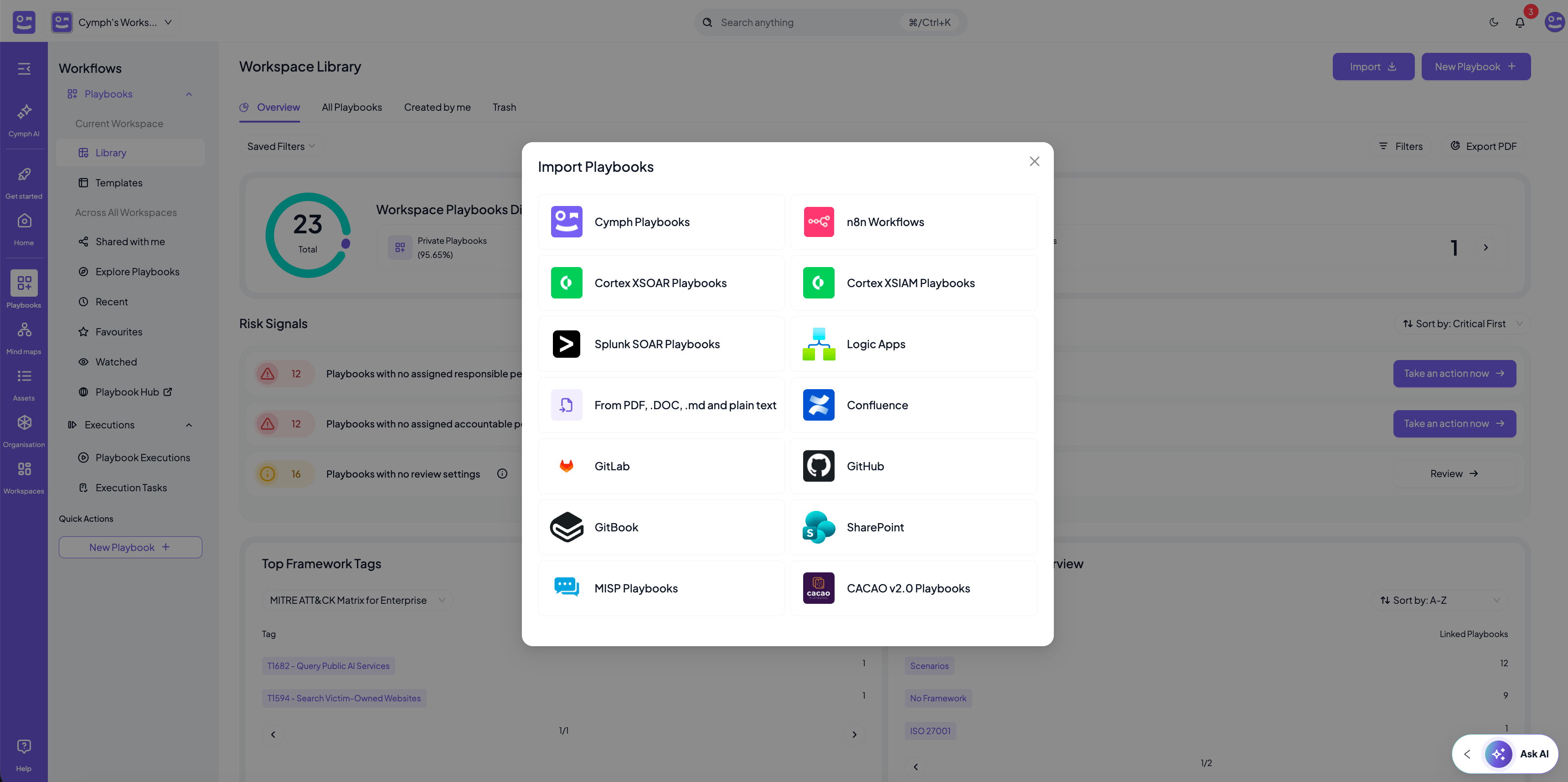
Ownership stays at the source. Playbooks imported from a SOAR keep a read-only workflow, and playbooks imported from a repository or knowledge management system remain linked to their origin. In both cases you still add and edit all Cymph metadata. See the ownership model for the details per source.
- Import playbooks covers file-based and live-system imports and the validation step.
- The content source integrations explain how to connect GitHub, GitLab, GitBook, SharePoint and Confluence.
- Creating your first playbook covers building a playbook from scratch or with AI.
2. New content has no governance context
An imported playbook arrives with its workflow and documentation, but nothing else. It has no responsible or accountable person, no reviewer or review frequency, no linked assets and, unless you enabled automatic framework mapping during import, no framework mappings. The same is true for a playbook created from scratch in the editor. This is by design. The source system knows how to run the playbook, but it does not know who owns it in your organisation, how often it must be reviewed, or which parts of your environment it protects. That context is what Cymph needs in order to govern the playbook, and it is what the rest of this use case adds.3. Add governance context
Take the imported playbook, for example a ransomware response playbook, and add the settings that describe how it is governed. All of them can be set from the Playbook Management System by hovering over the playbook, opening the action menu and choosing the setting under Playbook Settings. Most can also be set from the settings drawer inside the editor. See Modify playbook settings for the full list and where each one is editable. For a typical ransomware playbook, the governance context looks like this:
How to set each of these:
- RACI matrix, review settings, assets, incident type, response stage and last tested are all under Playbook Settings in the action menu. See How to change playbook settings.
- Framework mappings are set with the Set Mappings action. If you are unsure which techniques apply, ask for AI suggestions. See How to set mappings.
- Stage is changed with the mark as draft and revoke actions. See How to mark and unmark a playbook as draft.
- When a review takes place, record it with the Mark as Reviewed action so the review clock resets. See How to mark a playbook as reviewed.
Assets must exist in your workspace before you can link them to a playbook. You can add them manually, import them from a file, or discover them from Wazuh, Nessus, AWS or Azure. See Asset management.
4. Turn governance into risk signals
Once the context is in place, Cymph evaluates it continuously. Go to Playbooks → Library and open the Overview tab. The Risk Signals panel lists every governance and readiness gap across the playbooks in your workspace, with a count of affected playbooks and an action button next to each one.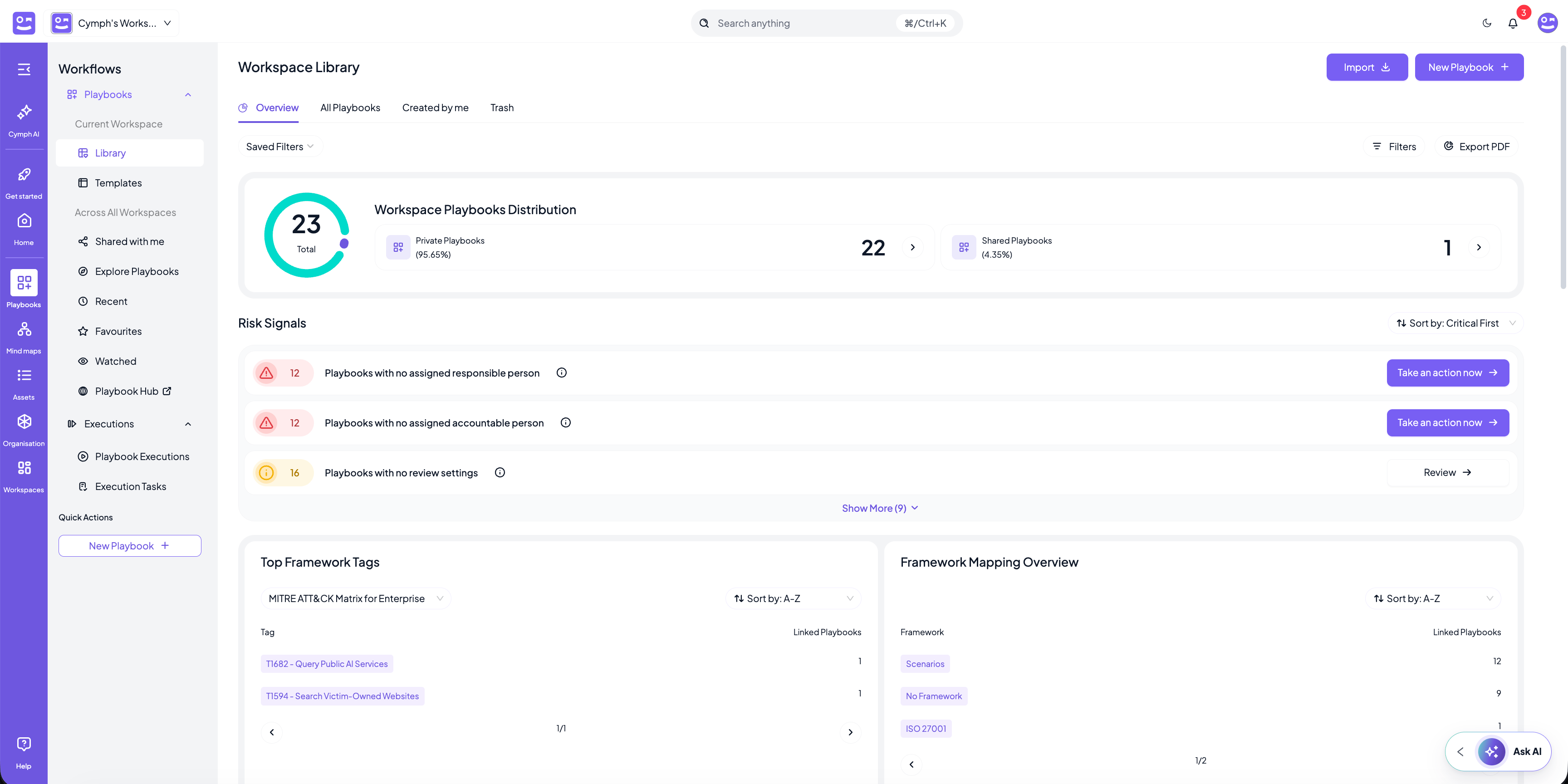
- Playbooks with no assigned responsible person and Playbooks with no assigned accountable person. Nobody owns the playbook.
- Playbooks without review settings and Playbooks not reviewed. Either no review cadence exists, or a review is overdue.
- Playbooks not tested the last 6 months. The playbook has never been exercised, or not recently.
- Orphaned playbooks and Playbooks with stale consulted, informed, or reviewer assignees. Someone in the RACI matrix no longer has access, for example because they left the workspace.
- Playbooks that include removed or retired assets. The playbook references parts of your environment that no longer exist.
- Playbooks without mappings. The playbook is invisible to your framework coverage analysis.
Keeping governance current
Governance is not a one-off exercise. Your environment changes, people move, and playbooks age. A few habits keep the signals green:- Review the Overview regularly. Make the Risk Signals panel part of your weekly or monthly routine, and export it to PDF with Export PDF when you need to report on readiness.
- Keep assets in sync. When new infrastructure appears, for example a new Azure production environment, import it as an asset and check which playbooks should cover it. See the Azure and AWS integrations.
- Use presets for coverage. Risk signals tell you what is wrong with the playbooks you have. Mind Maps presets tell you which techniques or controls have no playbook at all, and can generate template playbooks to close those gaps.
- Ask Cymph AI for help. When a playbook needs to be adapted to a new asset or scenario, Cymph AI can draft the changes using the context already in the platform.