

Are your response procedures actually covering the threats that matter to your organisation? Cymph gives you a structured way to answer that question using established cybersecurity frameworks such as MITRE ATT&CK, D3FEND, ATLAS and NIST CSF 2.0, and compliance standards such as ISO 27001, NIS2, GDPR and DORA.
The model is simple:
- Decide what you should be ready for by defining a scope, either by hand or derived from what your security stack actually detects.
- Measure response coverage by mapping your playbooks to that scope.
- Find the gaps, in particular the techniques you can detect but cannot yet respond to.
- Close them by generating the missing playbook, then reassess.
1. Define the scope
A framework such as MITRE ATT&CK is deliberately broad. It covers platforms, tactics and techniques that may have nothing to do with your environment. A preset is your tailored version of a framework: the subset of techniques or controls that you want to measure readiness against. Cymph gives you two ways to establish that subset.Path 1: Custom scope
Start from what you decide matters. Create a preset, pick a framework and version, and select the techniques yourself. For example, a preset named Ransomware Readiness based on MITRE ATT&CK for Enterprise would include initial access, credential access, lateral movement and impact techniques typically seen in ransomware campaigns. You do not have to click through the matrix manually. The scope can also be imported from a MITRE ATT&CK Navigator layer or from a set of Sigma rules, which is useful when a threat intelligence team or an assessment has already produced a technique list. Cymph also offers ready-made scenarios, such as phishing or ransomware, as a starting point. Custom scopes suit questions like: are we ready for this threat, this customer environment, or this audit? See Manage presets for the full wizard, and in particular Step 2: Select the scope source.Path 2: Detection-derived scope
Or start from your live environment. Connect Cymph to your SIEM and let your detection capabilities define the scope. Cymph reads the detection rules from the integration, collects the MITRE ATT&CK technique tags on each rule, and turns the result into the preset scope. When several integrations are selected, their techniques are merged. Supported detection sources are Wazuh, Microsoft Sentinel, Splunk Enterprise Security and Cortex XSIAM. The integration must exist in the workspace before you can pick it in the wizard. See Configure live source.Detection-derived scopes stay in sync with your SIEM. Cymph refreshes the scope from the configured sources whenever the preset is opened, so a rule added or removed in your SIEM is reflected the next time you look at the preset.
2. Measure response coverage
When you save the preset, you also choose which playbooks count towards coverage and what “covered” means. In the preset settings you scope the playbook set, for example only playbooks created by you or only those matching a saved filter, and in the coverage criteria you decide whether a mapped playbook is enough on its own or whether it must also have a certain status, such as Completed. See Step 4: Configure the preset settings and Step 5: Set coverage criteria. Cymph then maps your playbooks to the scope through their framework mappings and shows you the result:- Insights summarise coverage across the preset, for example the share of techniques covered and a per-tactic breakdown, so you can see at a glance where you perform well and where you fall behind.
- Detailed Overview shows every technique in scope. Green means covered, purple means partially covered, and grey means no playbook is mapped to it.
3. Find the detection-to-response gap
With a detection-derived scope, the Detailed Overview becomes a direct comparison between what you detect and what you can respond to. Every technique in the preset is one your SIEM has a rule for. Every grey technique is therefore a place where you can detect an attack but have no defined procedure to respond to it. Click a technique to see its details. For example, T1548.003 Sudo and Sudo Caching might show a detection rule in Wazuh but no mapped playbook. That is the gap this use case is about: you can detect it, but can you respond to it? The same view answers the question for custom scopes, where a grey technique means a threat you decided matters but have not prepared a response for.4. Close the gap
Identifying the gap is only the beginning. From an uncovered technique, Cymph can help create the missing procedure.- In the Detailed Overview, click the uncovered technique.
- Browse the detection and mitigation strategies listed for it.
- Click Generate Playbook on the strategy that applies to your context. Cymph AI drafts a playbook for that technique and maps it to the framework.
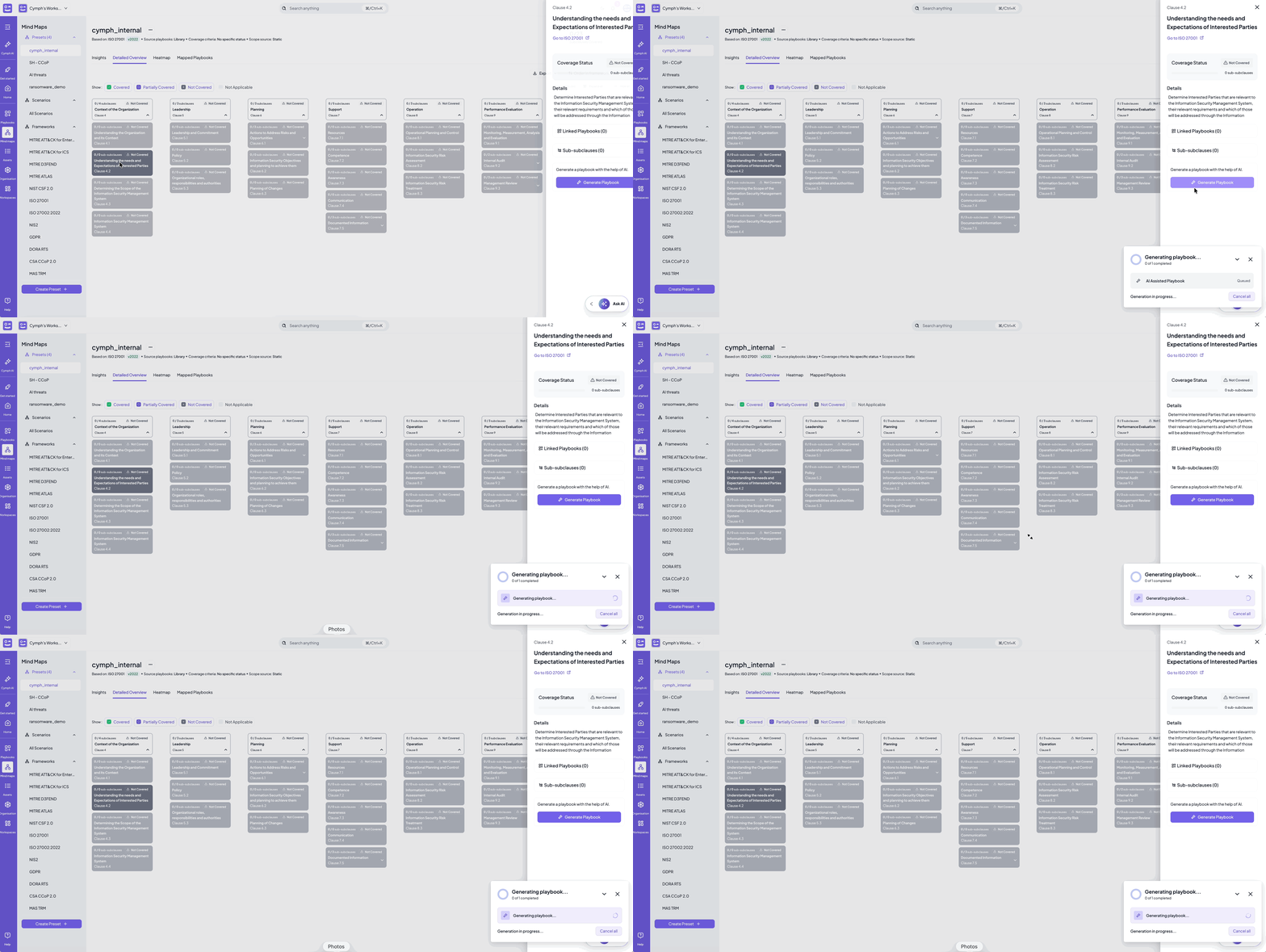
- Review and refine it in the editor, and add the governance context described in the governance use case: responsible and accountable persons, review settings and linked assets.
- Deploy it to your SOAR or ticketing system if it should run there. See Deploy playbooks.
- Reassess. Any change to your playbooks is reflected in your presets automatically. Once the new playbook meets the coverage criteria, the technique turns green.
AI-powered playbook generation is available for MITRE ATT&CK for Enterprise presets and requires the AI settings of your instance to be configured. For techniques where a template playbook already exists, the technique details also offer a recommended playbook that you can duplicate into your library instead. See Closing the gaps.