> ## Documentation Index
> Fetch the complete documentation index at: https://docs.cymph.io/llms.txt
> Use this file to discover all available pages before exploring further.
# Mind Maps
Gap analysis is one of the most critical functions for cybersecurity teams. Cymph provides a unified way to analyse your operational and compliance gaps based on the concept of mindmaps.
Mind Maps are versions of existing frameworks tailored to your organisational requirements. Frameworks are, in general, broad in scope. For example, the MITRE ATT\&CK framework covers many different platforms that might not even exist in your infrastructure. Thus, it is important that you select what is applicable and focus your gap analysis only to what is relevant for you. We call the customised framework version **a preset**. You can have as many presets as you want.
# Frameworks overview
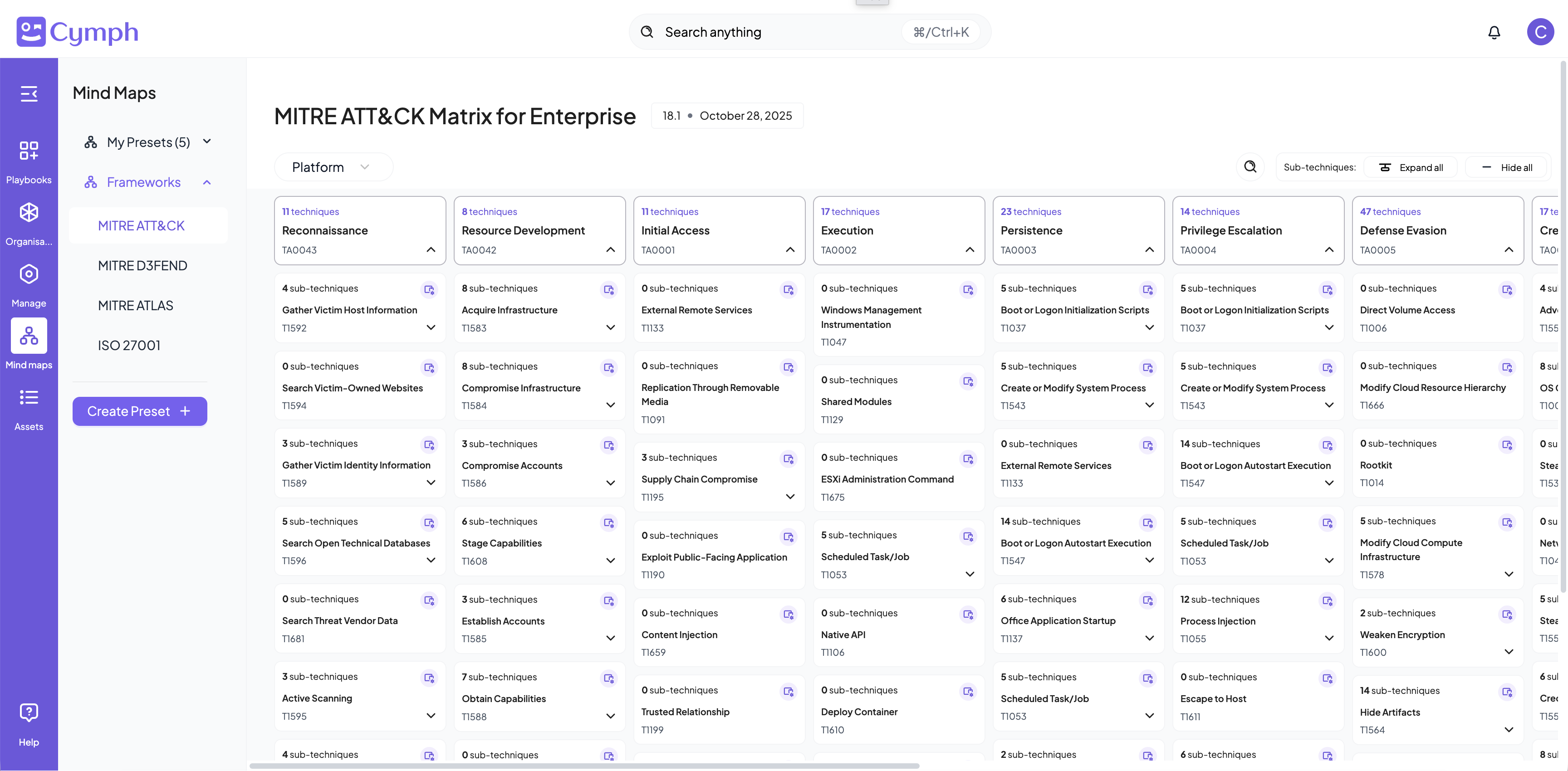
Before starting your customisation journey, you can have an overview of all the available frameworks. By navigating to the Mind Maps menu and selecting an available framework, you will be able to see the entire framework structure. Below you can see an example from MITRE ATT\&CK for Enterprises.
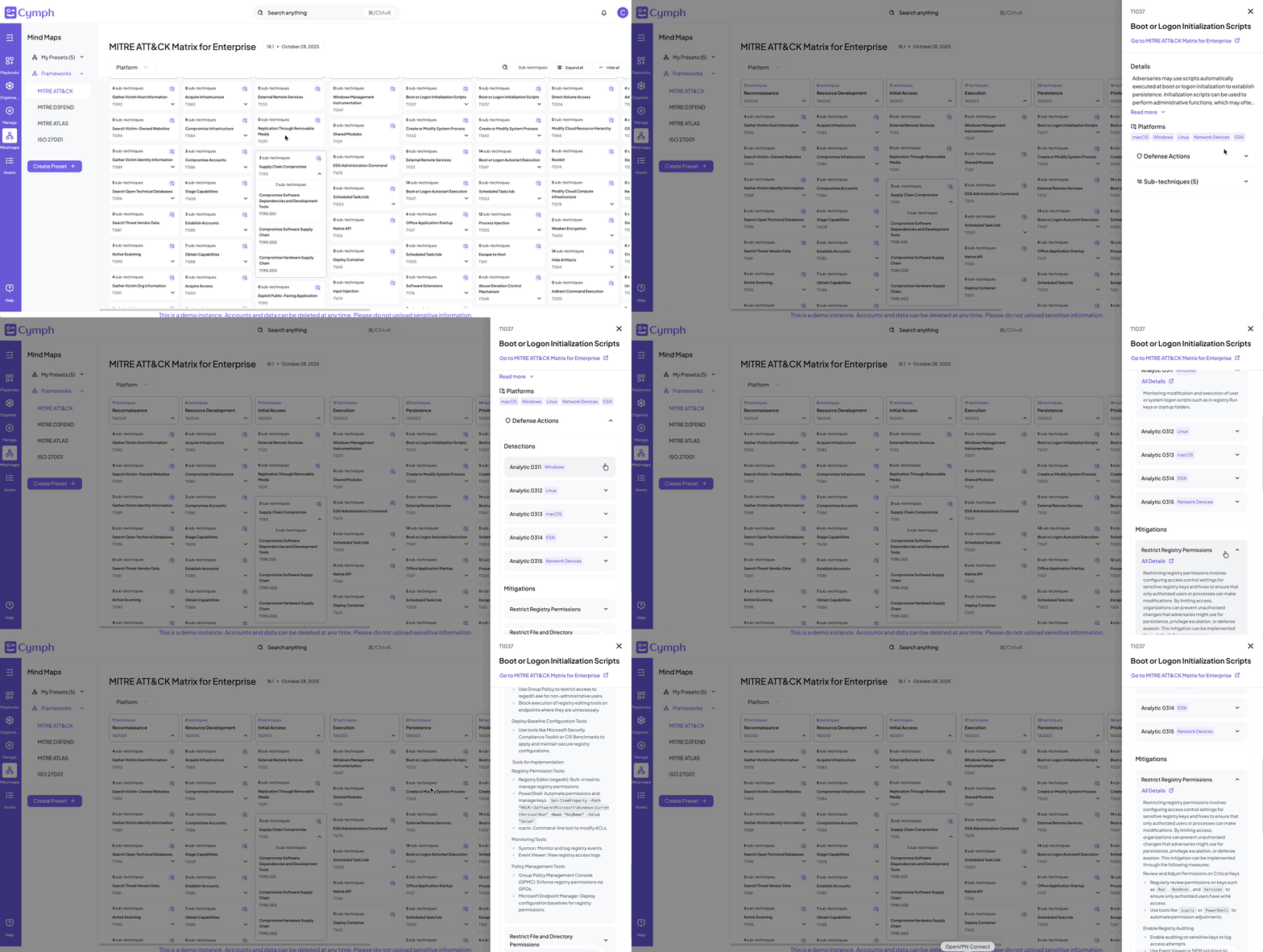
 For each technique/clause of each framework you can see further details. By clicking on it, you will be able to see a detailed description, references as well as detection and mitigation strategies (whenever applicable and available).
 If you are searching for specific information, the platform filter and quick search will help you get quicker to the framework part you are looking for.
# Presets
Presets are tailored versions of frameworks that provide insights and detailed overview of your coverage status. When you create a preset, you define the scope for the selected framework (which techniques/clauses are applicable) and the playbook coverage criteria (for example playbook status must be "Complete"). You can see the detailed documentation on how to create a preset [here](/how-tos/create-and-manage-presets).
The coverage status of a preset is based upon the mapped playbooks found in your management system. Any changes on your playbooks are automatically reflected to your presets. Playbooks that are revoked, marked as draft or have expired are excluded from the coverage calculations.
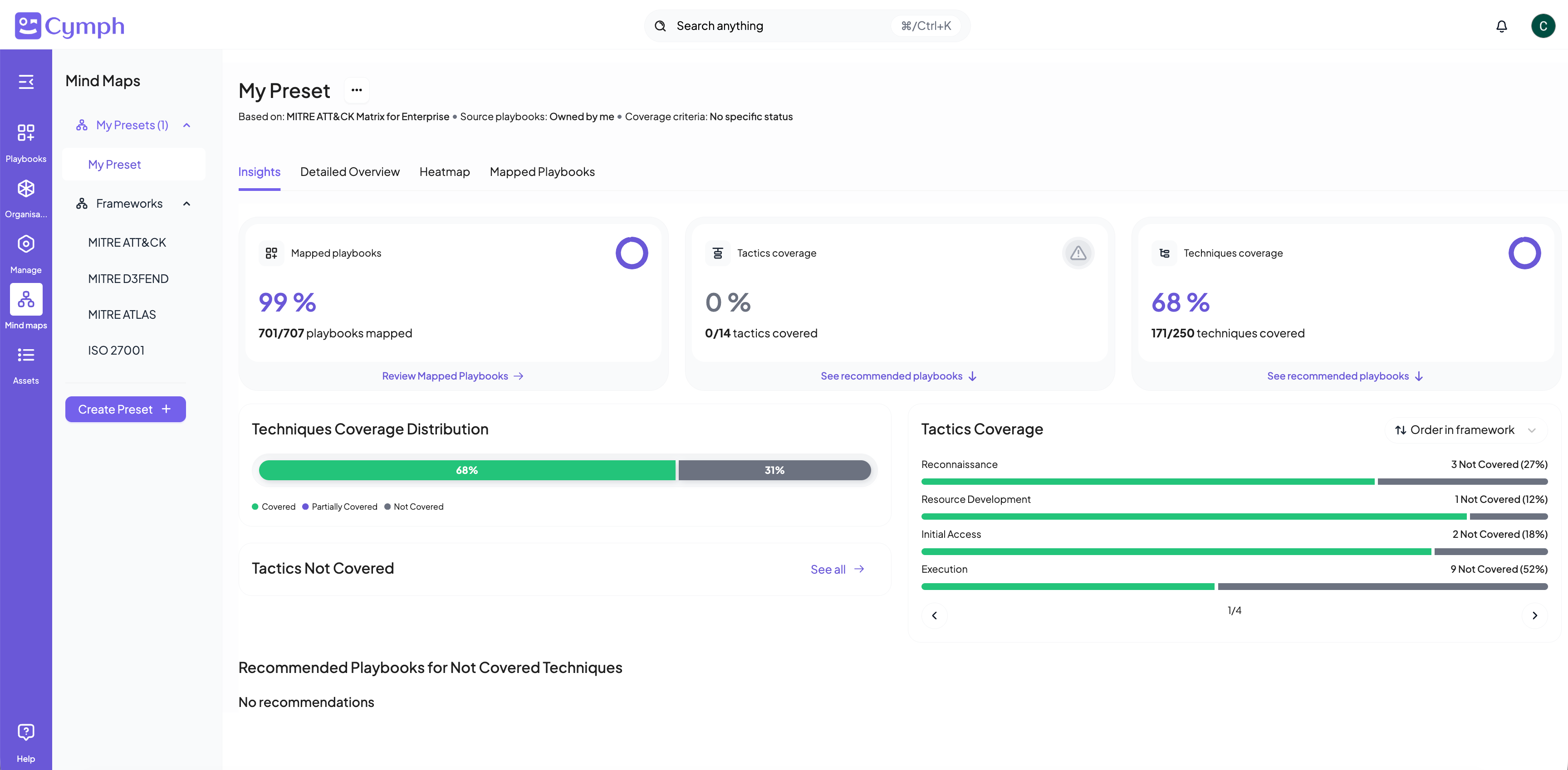
**Insights** help you quickly assess your coverage status. You can see the coverage distribution across several dimensions of the framework. In the screenshot below, you see an example from a preset of MITRE ATT\&CK framework. You can quickly identify that although 99% of the playbooks are mapped to the framework, only 68% of the relevant techniques are covered. The tactics coverage panel provides summary information per tactic, so you can see on which tactics you perform well and for which tactics your coverage falls behind.
If you are searching for specific information, the platform filter and quick search will help you get quicker to the framework part you are looking for.
# Presets
Presets are tailored versions of frameworks that provide insights and detailed overview of your coverage status. When you create a preset, you define the scope for the selected framework (which techniques/clauses are applicable) and the playbook coverage criteria (for example playbook status must be "Complete"). You can see the detailed documentation on how to create a preset [here](/how-tos/create-and-manage-presets).
The coverage status of a preset is based upon the mapped playbooks found in your management system. Any changes on your playbooks are automatically reflected to your presets. Playbooks that are revoked, marked as draft or have expired are excluded from the coverage calculations.
**Insights** help you quickly assess your coverage status. You can see the coverage distribution across several dimensions of the framework. In the screenshot below, you see an example from a preset of MITRE ATT\&CK framework. You can quickly identify that although 99% of the playbooks are mapped to the framework, only 68% of the relevant techniques are covered. The tactics coverage panel provides summary information per tactic, so you can see on which tactics you perform well and for which tactics your coverage falls behind.
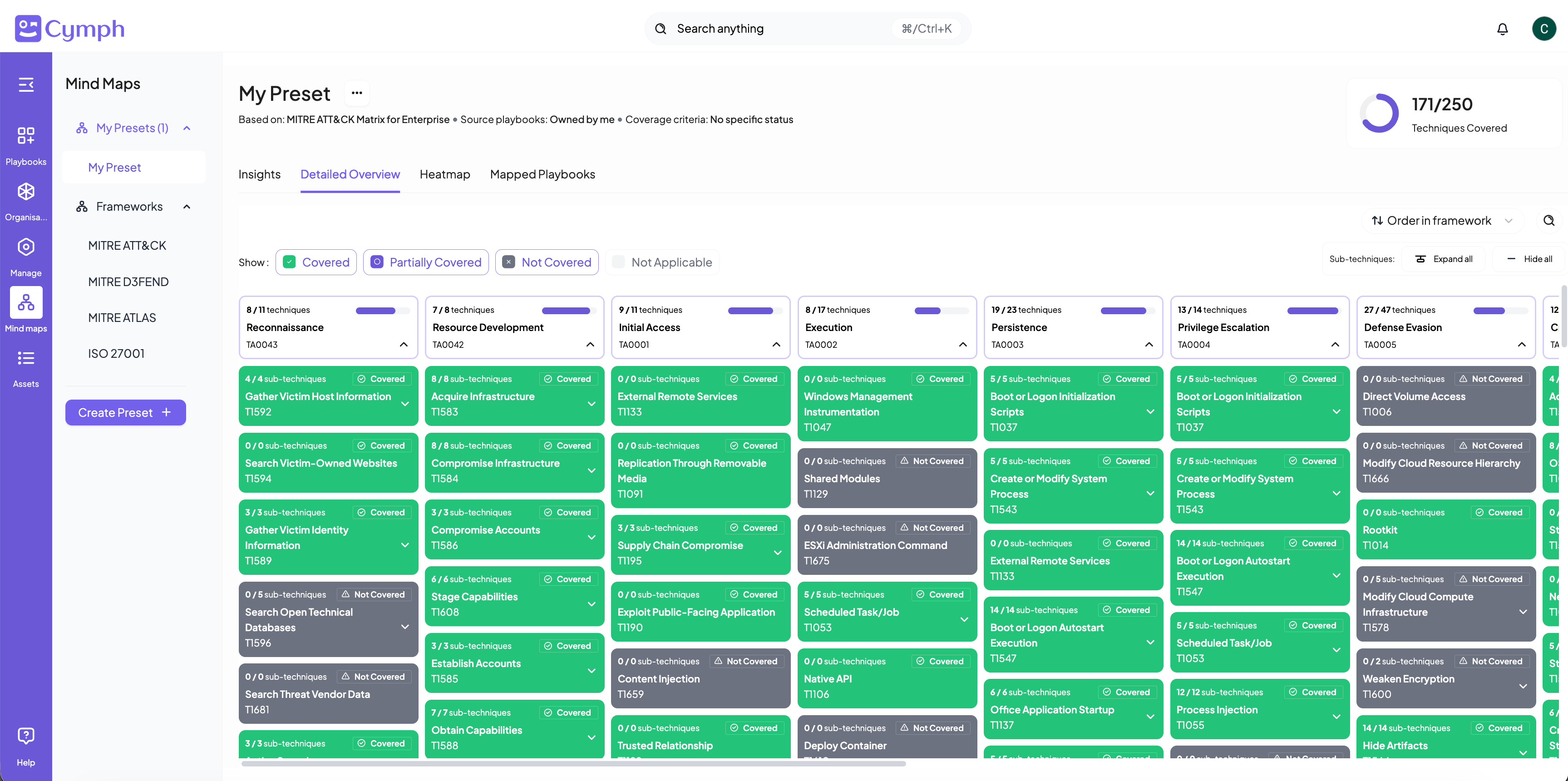
 The **Detailed Overview** provides all the coverage details. From here, you can see the status of each individual technique/clause. The green color means the technique/clause is covered, gray means no playbook is associated with it. Purple color means that the technique/clause is partially covered. By clicking on a technique/clause, you can see the same level of details as in the frameworks overview page.
 # **Closing the gaps**
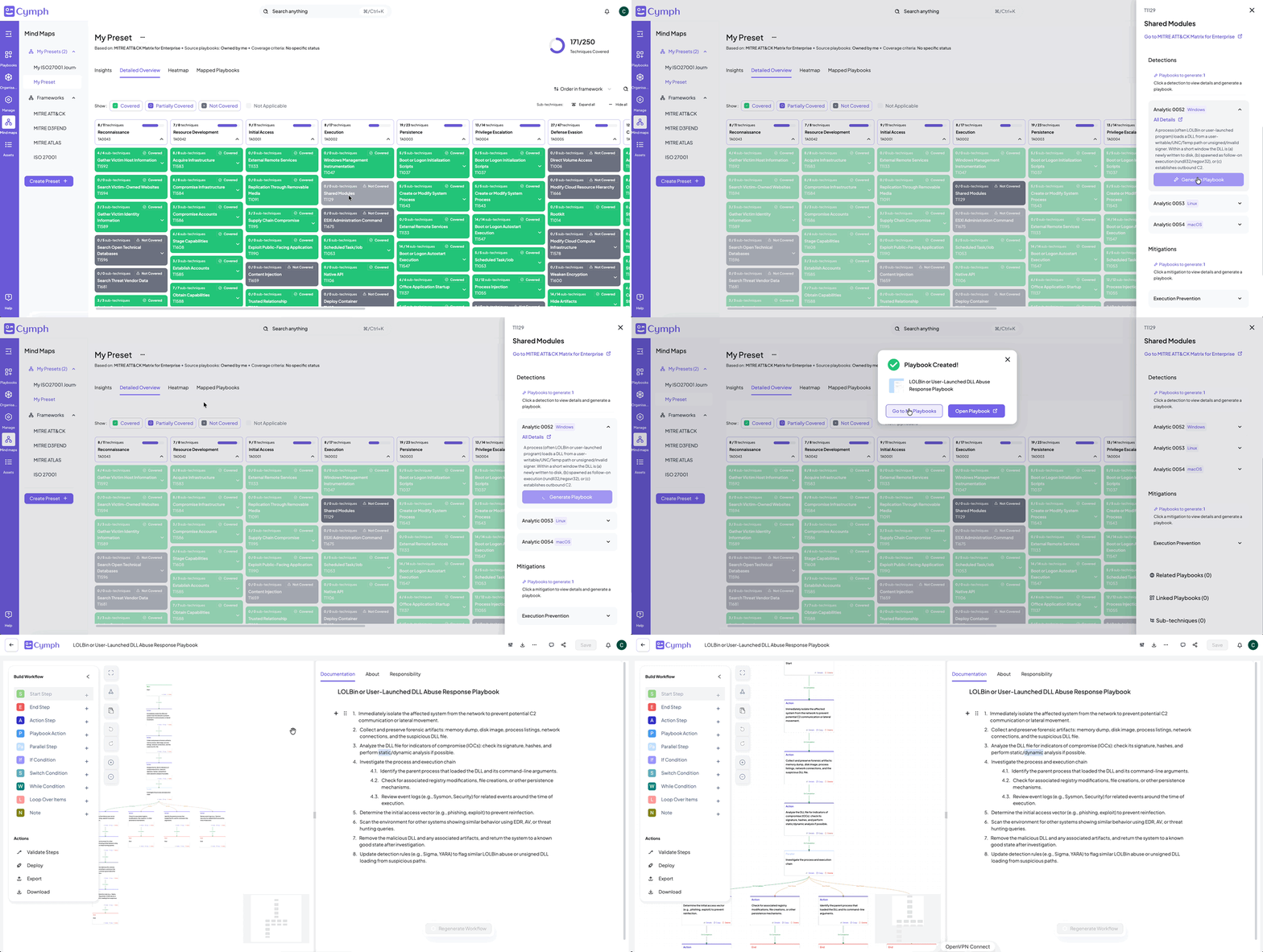
In the example screenshot above, you will notice that some techniques are not covered. It would be great to be able to do something about, wouldn't it? The Cymph platform allows you to generate template playbooks for these gaps! Powered by AI, you can generate detection and mitigation playbooks for all the techniques. It is an easy 3-step process:
1. Click on a technique that is currently not covered
2. Browse through the detection and mitigation strategies
3. Click on Generate Playbook for a strategy that is applicable to your context and a new playbook will be automatically generated
# **Closing the gaps**
In the example screenshot above, you will notice that some techniques are not covered. It would be great to be able to do something about, wouldn't it? The Cymph platform allows you to generate template playbooks for these gaps! Powered by AI, you can generate detection and mitigation playbooks for all the techniques. It is an easy 3-step process:
1. Click on a technique that is currently not covered
2. Browse through the detection and mitigation strategies
3. Click on Generate Playbook for a strategy that is applicable to your context and a new playbook will be automatically generated
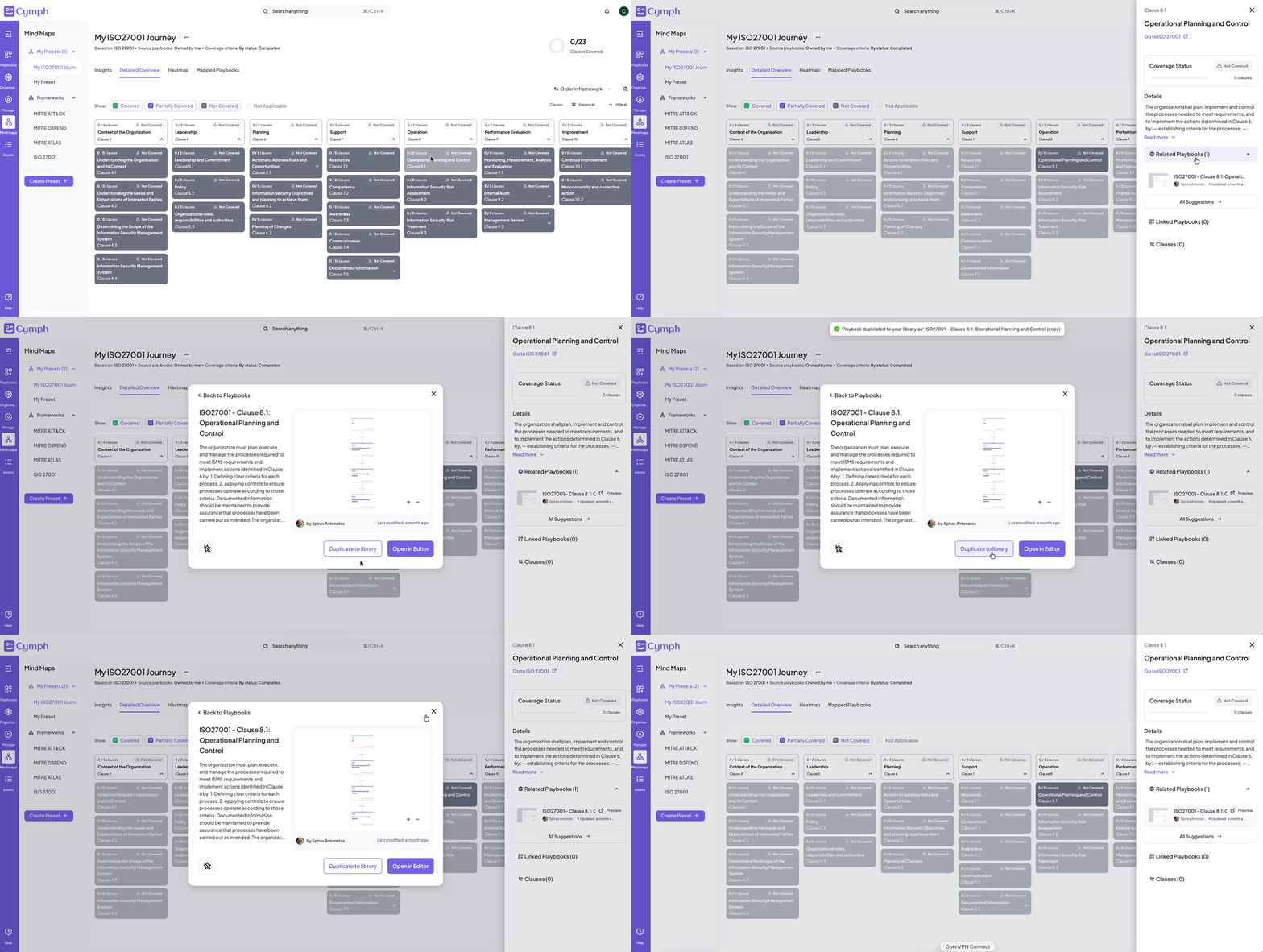
 Currently, the AI-powered generation is enabled for MITRE ATT\&CK for Enterprise presets. But there is another way to start closing your gaps: recommended playbooks. In certain scenarios, there might be a template playbook linked to the technique you lack a playbook for. Duplicate the recommended playbook to your library and start from there.
 # Frameworks supported
| Framework | Version | Link |
| ---------------------------------------------------------- | ---------------------------------------------- | ------------------------------------------------------------------------------------------------------------------------------ |
| MITRE ATT\&CK for Enterprises | v16.1 to v19.1 | [https://attack.mitre.org/](https://attack.mitre.org/) |
| MITRE D3FEND | v1.2.0 to v1.4.0 | [https://d3fend.mitre.org/](https://d3fend.mitre.org/) |
| MITRE ATLAS | v2025.11.2 to v2026.06 | [https://atlas.mitre.org/](https://atlas.mitre.org/) |
| ISO 27001 | Edition 3, 2022 | [https://www.iso.org/standard/27001](https://www.iso.org/standard/27001) |
| ISO 27002:2022 | Edition 3, 2022 | [https://www.iso.org/standard/75652.html](https://www.iso.org/standard/75652.html) |
| NIS2 | Directive (EU) 2022/2555 | [https://eur-lex.europa.eu/eli/dir/2022/2555](https://eur-lex.europa.eu/eli/dir/2022/2555) |
| GDPR | GDPR (EU) 2016/679 — Consolidated Version 2024 | [https://eur-lex.europa.eu/eli/reg/2016/679/oj](https://eur-lex.europa.eu/eli/reg/2016/679/oj) |
| DORA RTS on ICT Risk Management
# Frameworks supported
| Framework | Version | Link |
| ---------------------------------------------------------- | ---------------------------------------------- | ------------------------------------------------------------------------------------------------------------------------------ |
| MITRE ATT\&CK for Enterprises | v16.1 to v19.1 | [https://attack.mitre.org/](https://attack.mitre.org/) |
| MITRE D3FEND | v1.2.0 to v1.4.0 | [https://d3fend.mitre.org/](https://d3fend.mitre.org/) |
| MITRE ATLAS | v2025.11.2 to v2026.06 | [https://atlas.mitre.org/](https://atlas.mitre.org/) |
| ISO 27001 | Edition 3, 2022 | [https://www.iso.org/standard/27001](https://www.iso.org/standard/27001) |
| ISO 27002:2022 | Edition 3, 2022 | [https://www.iso.org/standard/75652.html](https://www.iso.org/standard/75652.html) |
| NIS2 | Directive (EU) 2022/2555 | [https://eur-lex.europa.eu/eli/dir/2022/2555](https://eur-lex.europa.eu/eli/dir/2022/2555) |
| GDPR | GDPR (EU) 2016/679 — Consolidated Version 2024 | [https://eur-lex.europa.eu/eli/reg/2016/679/oj](https://eur-lex.europa.eu/eli/reg/2016/679/oj) |
| DORA RTS on ICT Risk Management
Framework - Title II | Commission Delegated Regulation (EU) 2024/1774 | [https://www.springlex.eu/en/packages/dora/rts-rmf-regulation/](https://www.springlex.eu/en/packages/dora/rts-rmf-regulation/) |